Lead Routing for Sales Teams
Lead routing for sales teams: requests go to the right agent by language, city, project and limits, replacing a routing service of about $400 a month.
- n8n
- GoHighLevel
- Google Sheets
The business
A real estate agency with several sales teams buys ads for different properties. Every request lands in GoHighLevel and has to reach the right agent within minutes. Agents differ by language, by the cities they cover and by the projects they sell, so lead routing for sales teams is a daily job here, not a setting you configure once.
Thirty-one agents work from one shared pool. Each has a limit on how many new requests they can take in a day, a week and a month.
The problem
A paid third-party service handled the distribution, at about $400 a month by the owner's estimate. It worked until the agency needed a rule the service did not have. A Spanish request should not go to an agent who speaks only English. A request for a property nobody sells still needs an owner. A bilingual agent who burns through the daily limit on English requests has nothing left when the Spanish ones arrive.
Each missing rule turned into a manual step. Someone watched the inbox, reassigned requests by hand and checked who was already at the cap. A request that arrived at 21:40 for a project with no agent sat in a list until morning, and in real estate the first agent to call usually wins the viewing.
The agency also paid every month for settings it could not change. It wanted its own rules, in a tool its sales team could read and edit.
Why not tune the old service
The agency looked at staying with the service and at a round-robin rule inside its CRM. Round-robin spreads requests evenly, which is the opposite of what a team with scarce bilingual agents needs. The table shows where each option stopped.
| Manual dispatch | Paid routing service | What we built | |
|---|---|---|---|
| Language, city and project match | Remembered by the dispatcher | Partly, with fixed settings | Read from tags and checked against the roster |
| Daily, weekly and monthly limits | Counted by hand | One limit type | Three limits per agent, updated after every assignment |
| Bilingual agents kept for Spanish requests | Not possible at volume | Not covered | English-only agents go first, bilinguals return when their load catches up |
| A project nobody sells | Request waits for a decision | Request stalls | Project filter is dropped so the request still gets an agent |
| After hours or no free agent | Waits until someone looks | Waits | Held in a queue and retried every 15 minutes |
| Who edits the rules | The dispatcher | The vendor's settings page | The sales team, in a spreadsheet |
How lead routing for sales teams works here
We built one n8n workflow that sits between GoHighLevel and a Google Sheets roster. It reads a request, picks one agent, writes the result back to the CRM and updates the agent's counters. No person decides, but a person owns the roster the decision reads from.
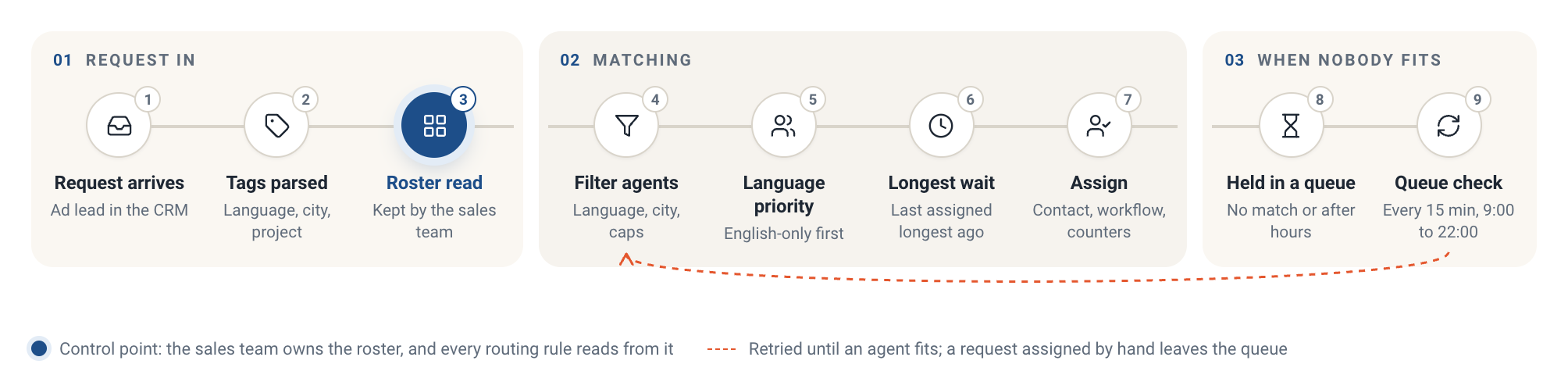
The routing route. The roster is the control point: the sales team edits it, and every rule reads from it.
- A request arrives in GoHighLevel from an ad. The workflow starts on the new contact.
- It reads the contact's tags and splits them into language, city and project.
- It reads the roster from Google Sheets: one row per agent with languages, cities, projects, an active flag and three limits.
- It keeps agents who speak the language, cover the city, sell the project, are marked active and still have room under the daily, weekly and monthly limits.
- If no agent has the project, the project filter is dropped so the request does not get stuck.
- English requests go first to agents who speak only English. Bilingual agents are kept for Spanish requests, and they rejoin the English pool once their load for the day reaches the lowest English-only load.
- Among the agents left, the one who received a request longest ago gets it.
- The workflow assigns the contact in GoHighLevel, adds it to the right workflow and updates the agent's counters: last assignment, today, this week, this month.
- Outside working hours, or when nobody fits, the request goes to a queue. The queue is checked every 15 minutes from 9:00 to 22:00.
- A queued request is removed as soon as it is assigned, including when someone assigns it by hand in the CRM.
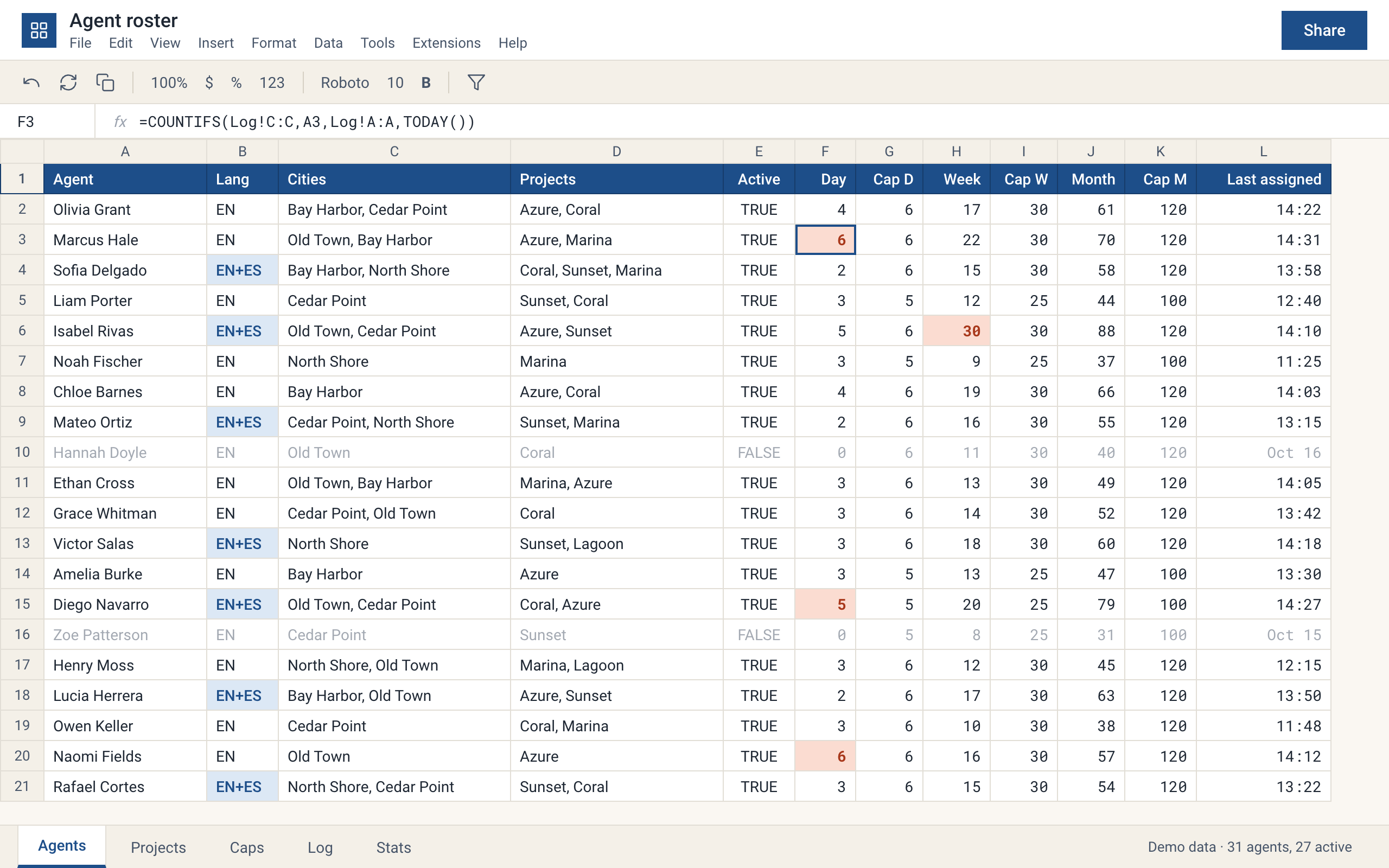
The roster. Cells at a limit turn coral, bilingual agents are blue, inactive agents are greyed out. Redrawn with demo data.
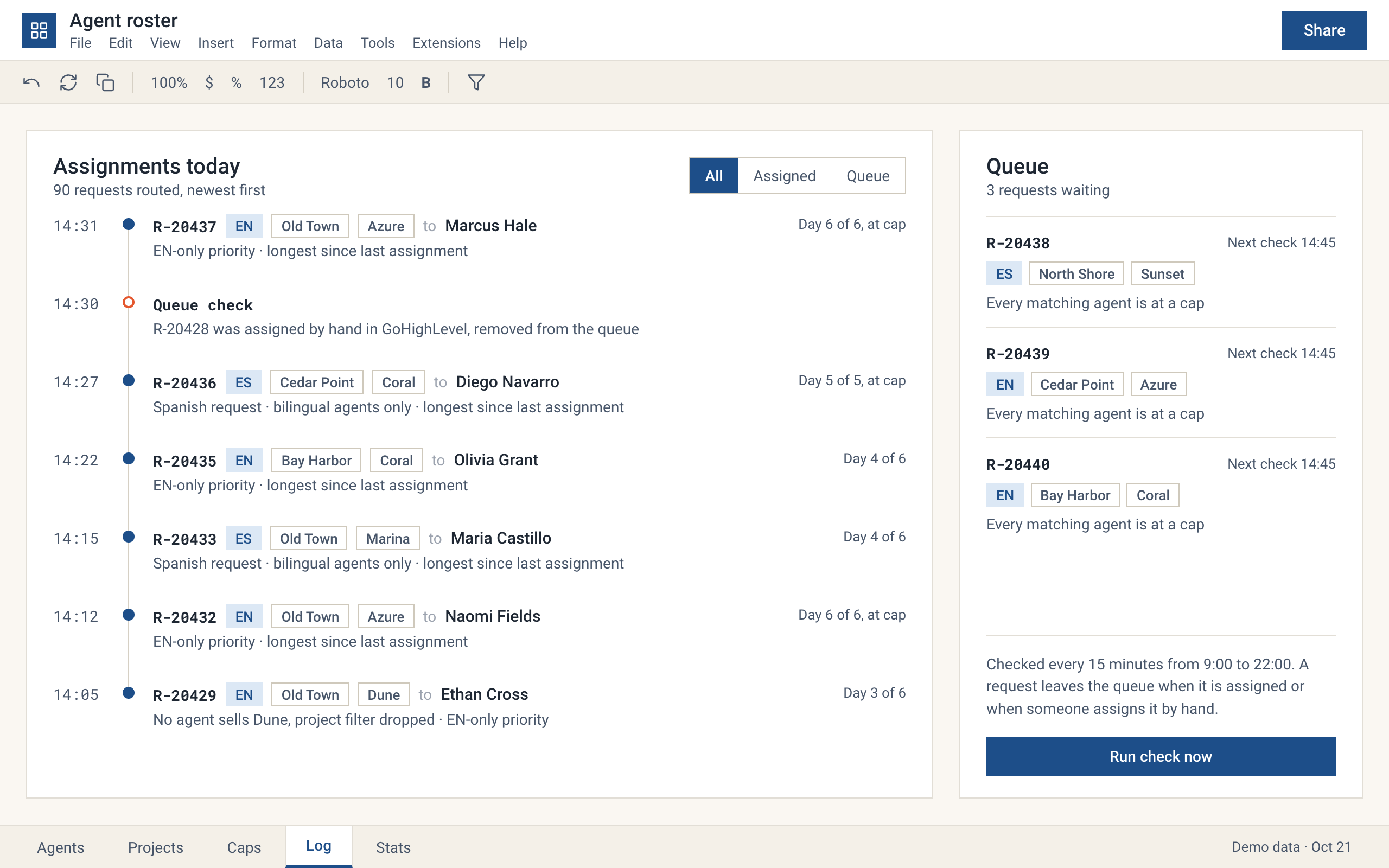
Assignment log and queue. Each line says why that agent was chosen. Redrawn with demo data.
Keeping bilingual agents for the requests that need them
The second rule is the one the old service could not express. Spanish requests can only go to bilingual agents, and there are fewer of them. If English requests went to everyone, the bilingual agents would hit their daily limit by lunch and the Spanish requests would wait.
So English requests go to English-only agents first. A bilingual agent comes back into the English pool only when their load for the day has caught up with the lowest English-only load. The sheet shows the rule in one cell, so anyone on the team can see why a request went where it did.
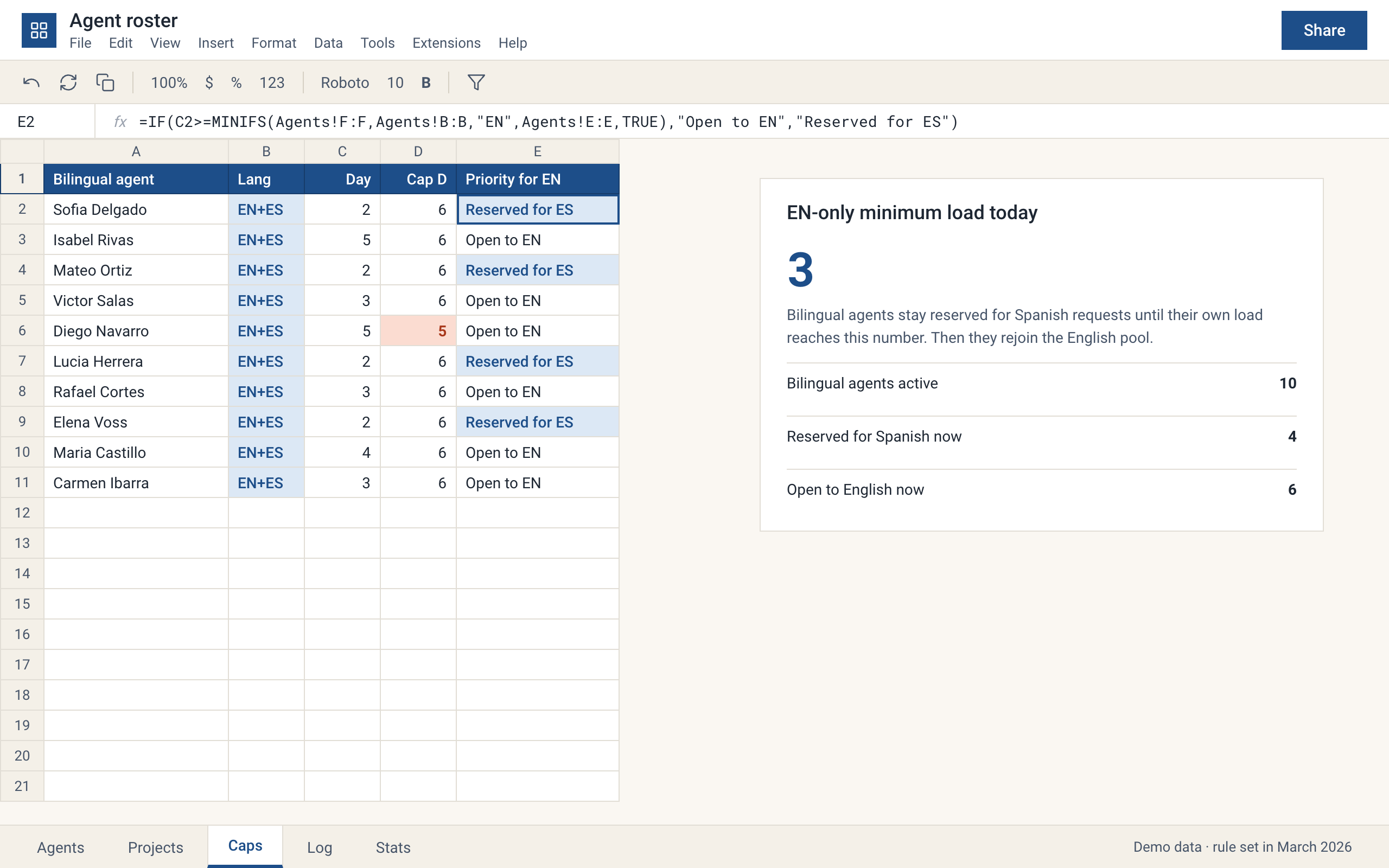
The bilingual reserve. Four agents sit below the English-only minimum, so they wait for Spanish requests. Redrawn with demo data.
The hard parts
Requests that fit nobody
Some requests come for a project no agent sells. Others arrive at night, or when every matching agent is at a limit. Dropping them would lose leads, and holding them in the CRM meant someone had to remember. The queue holds each request, retries it every 15 minutes during working hours and drops it from the queue the moment it is assigned, by the workflow or by a person.
Rules the team can change without us
The roster lives in Google Sheets because the sales team already works there. Adding an agent, switching one off for a week or raising a limit is an edit in a row. We wrote a short procedure and recorded a video that show how to maintain the roster, so a new sales manager can pick it up in one sitting.
Changing rules on a live system
In March 2026 the agency asked for per-agent limits, English-first priority and exceptions for individual projects. The workflow was already routing requests every day, so we shipped each rule behind the roster columns and checked it against the assignment log before the team relied on it. In September 2026 we added monitoring and availability statistics, so the team can see who is at a limit and how many requests each agent took.
Result
The system has routed the agency's requests every day since launch. It covers 31 agents, and in normal conditions nobody dispatches by hand. The agency stopped paying for the routing service, which we estimate at about $400 a month, and the workflow has run steadily without notable problems.
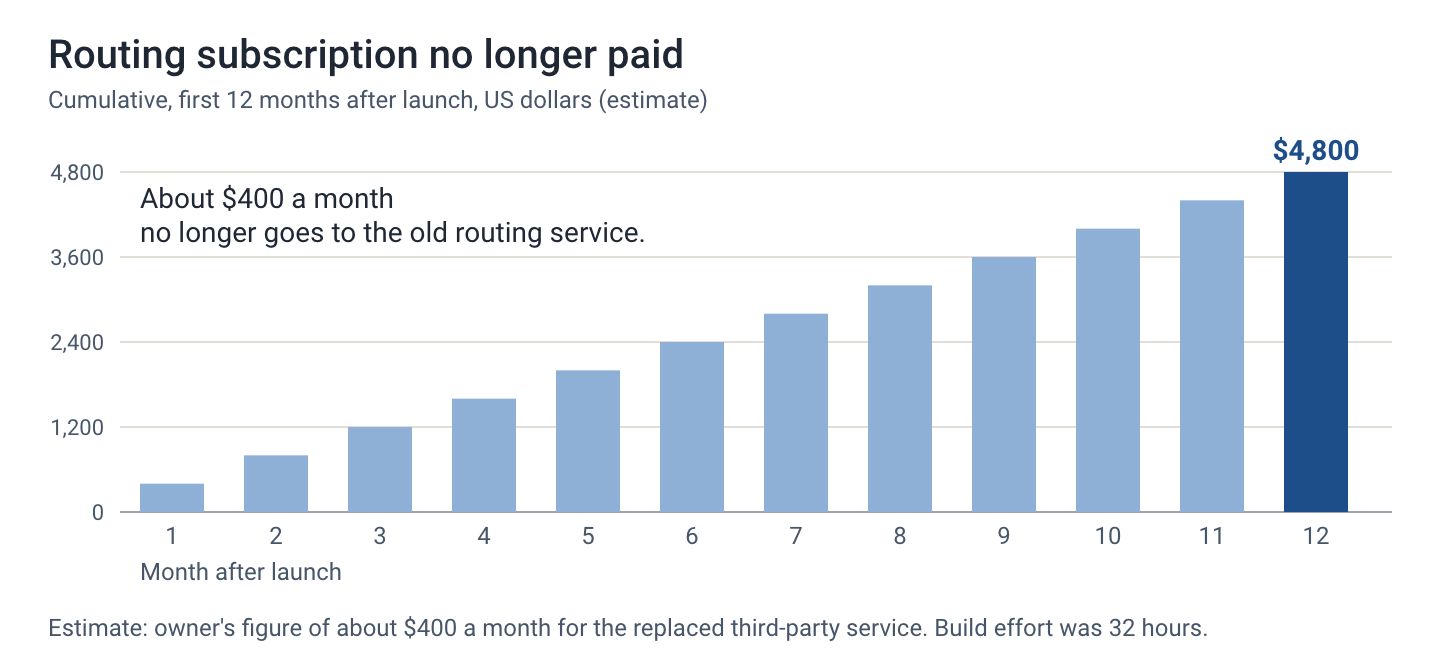
What the old subscription would have cost over the first year. Estimate based on about $400 a month.
| Before | After | |
|---|---|---|
| Who picks the agent | A paid service plus a person fixing exceptions | One workflow, no manual dispatch in normal conditions |
| Monthly cost of routing | About $400 for the service | No subscription |
| Spanish requests | Competed with English ones for bilingual agents | Bilingual agents held in reserve |
| A request nobody can take | Waited until someone noticed | Queued and retried every 15 minutes |
| Changing a rule | Vendor settings | A row in the team's spreadsheet |
What the agency gained most is control. The sales team can see the roster, the limits and the reason behind every assignment, and a new rule is a change we make in days, not a feature request to a vendor.
Our part
We built the n8n workflow, the roster logic, the queue and the GoHighLevel integration, wrote the guides the team uses, and added the monitoring in September 2026. When the agency changes its rules, we change the system. That has been the arrangement since October 2025. We also built the lead distribution system, a related project that applies the same approach to a different lead business.
If you are not sure your own rules are worth automating yet, this audit of lead routing in a CRM shows what to check first.
Running a process like this by hand?
Tell us what your team repeats every week. We reply within one business day with a plan and a price.