Lead Distribution System
Lead distribution system for a company that sells leads: filters, caps, duplicate checks and refunds in one panel instead of scattered workflows.
- n8n
- PostgreSQL
- GoHighLevel
The business
This company buys advertising, collects the inquiries it brings in and sells each one to a service business as a single lead. About ten buyers work with it, in different industries, and every buyer has its own conditions: which states it serves, how many leads it can take a day, how much it has prepaid.
A small operations team looks after the buyers. The lead distribution system we built is the layer between the ad accounts and those buyers, and the team's only place to change how it behaves.
The problem
A lead is worth money for a few minutes. If it goes to a buyer who is already full, it waits. If it goes to a buyer who bought the same person last week, it gets refunded. Before the system, nobody could say for sure where a given lead would land.
Routing lived in two kinds of places. Some rules sat in third-party services. The rest were separate GoHighLevel workflows, one set per buyer. To raise one buyer's daily cap, someone had to find the right workflow. To check duplicates, they searched by hand. Refunds meant editing records in several tools and hoping the quota still matched.
Nobody could see the money either. Ad spend was in one place, sale prices in another, so what a lead cost and what it earned was a spreadsheet exercise at the end of the month. Every new buyer made it worse, because each one meant another set of workflows to copy and keep in sync.
Why not a ready-made distribution platform
Ready-made lead distribution platforms exist, and the team looked at them. They cover the basics well. The gaps were in the details this company sells on: a duplicate window per buyer, prepaid balances that drop with every lead, delivery into each buyer's own GoHighLevel account, and refunds that return the quota.
| Scattered workflows | Off-the-shelf platform | What we built | |
|---|---|---|---|
| Where rules live | Third-party services and one workflow set per buyer | Inside the vendor's rule editor | One backend, one panel |
| Duplicates | Checked by hand | Generic, one window for everyone | Per buyer, 90 days, by email or phone |
| Delivery to the buyer | Workflow copied per buyer | Standard webhook or email | Contact in the buyer's GoHighLevel, then their webhook |
| Refund or reassign | Edit several tools | Refund only | One click, quota moves in one transaction |
| Cost against revenue | Monthly spreadsheet | Separate reports | Ad spend and sales in one analytics screen |
How the lead distribution system works
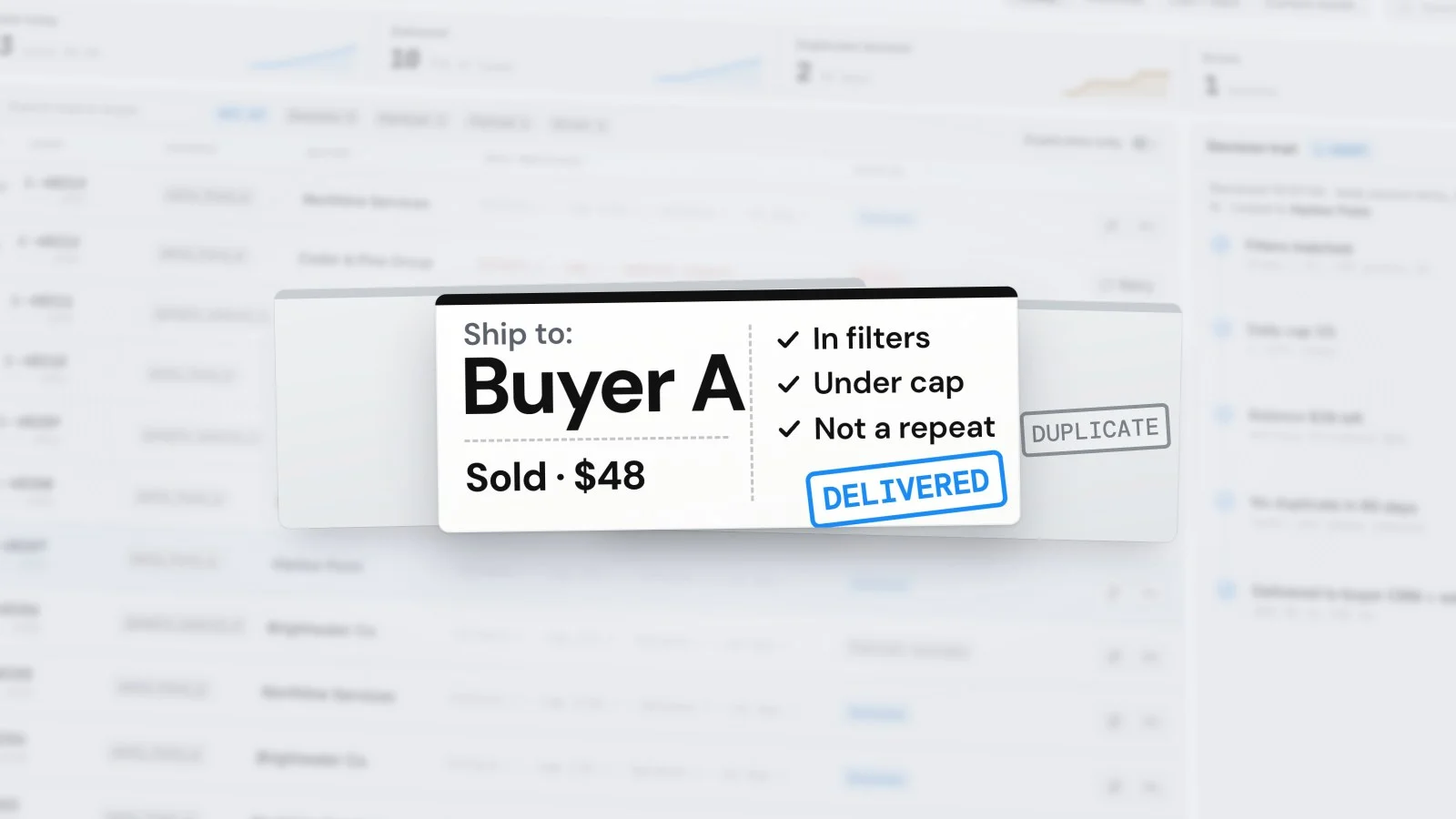
Every lead takes the same route, in the same order, and every decision is written down. People step in at one point: the panel, where the team refunds or reassigns.
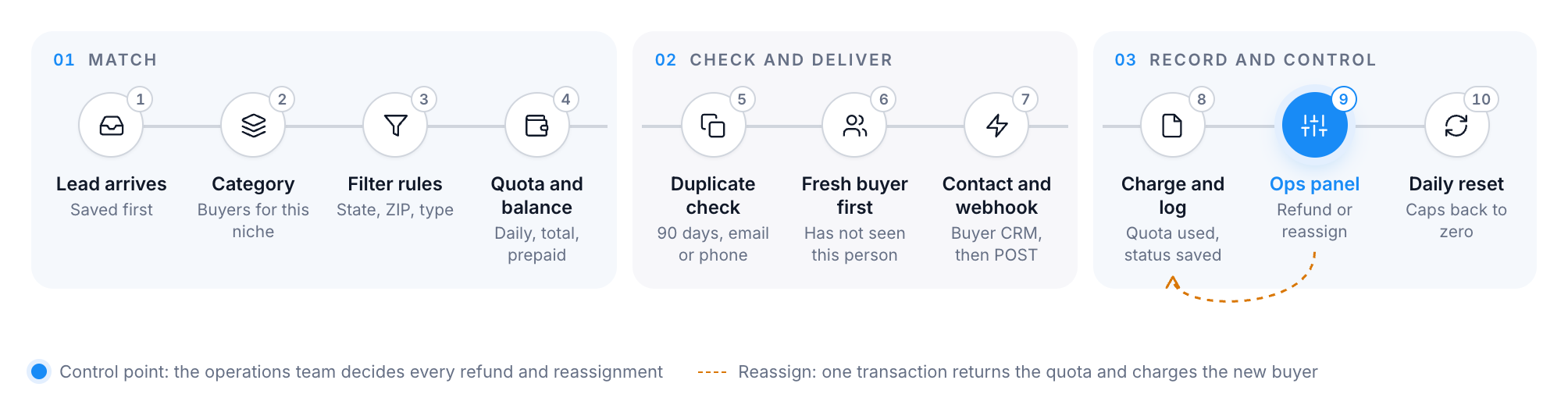
The route of a lead. The ops panel is the only place where a person overrides it. Redrawn with demo data.
- A lead reaches the central backend, built on n8n and PostgreSQL, and is saved before anything else happens.
- The system picks the buyers that take this category.
- It applies each buyer's filter rules, such as state or ZIP code. An asterisk means any value.
- It drops buyers who reached the daily or total cap or ran out of prepaid balance. Primary buyers go first.
- It checks whether the buyer already received this person: same email, ignoring case, or same phone within 90 days.
- When several buyers fit, it prefers the one who has not seen this person.
- It creates or updates the contact in the buyer's GoHighLevel account and posts the lead to the buyer's webhook.
- It charges the quota and the balance and saves the assignment with its status.
- The operations team can refund or reassign any lead from the panel.
- Daily caps reset on a schedule, so the next day starts clean.
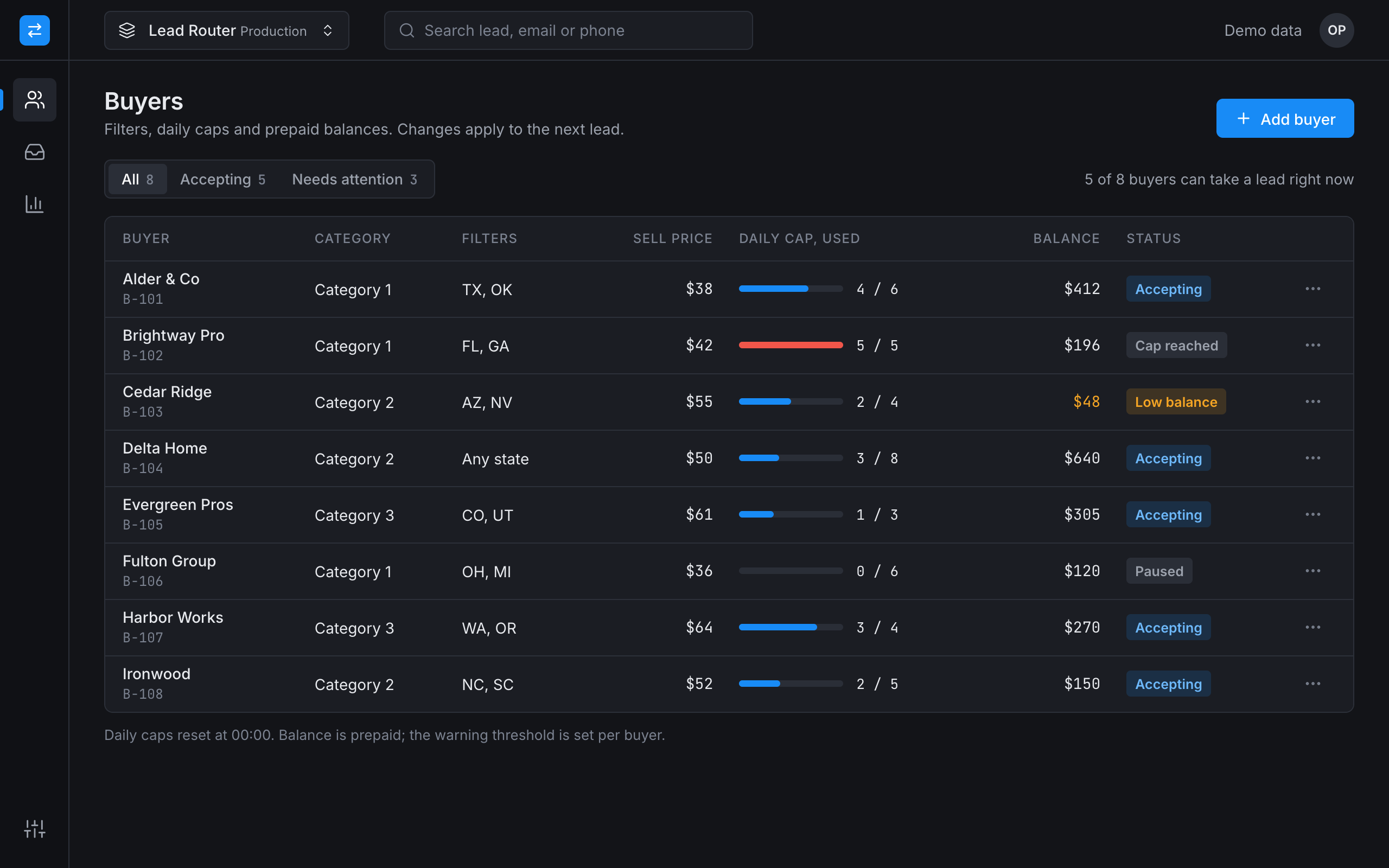
Buyer list. Cap reached, low balance and paused buyers are visible at a glance. Redrawn with demo data.
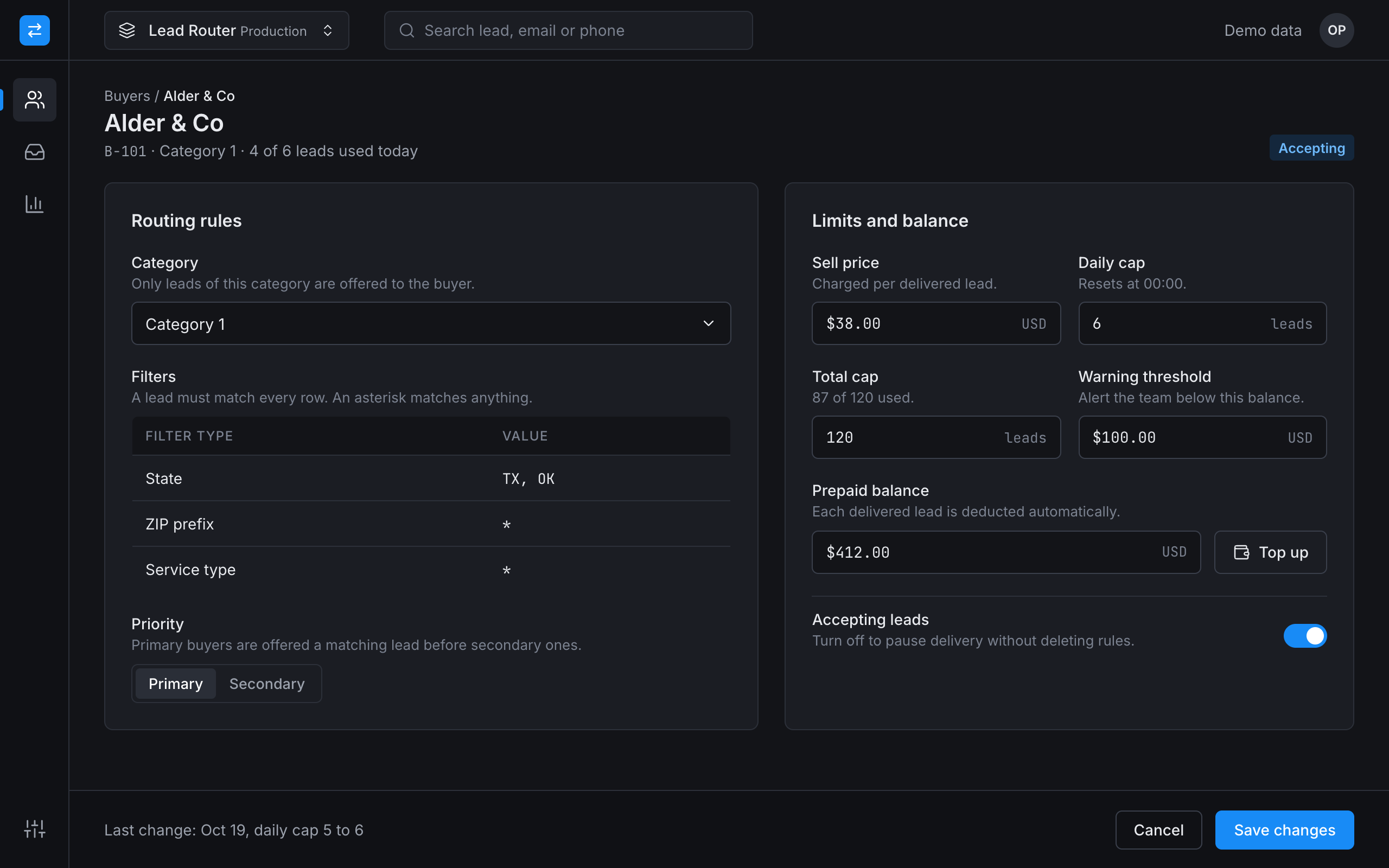
Buyer settings. Rules, caps and balance in one form; changes apply to the next lead. Redrawn with demo data.
Lead log, refunds and reassignment
When a buyer says a lead was wrong, the team used to dig through tools to find out why it went there. Now each lead in the log shows the decision trail: which category and filters matched, which buyers were dropped for quota, what the duplicate check found, and where the lead was delivered.
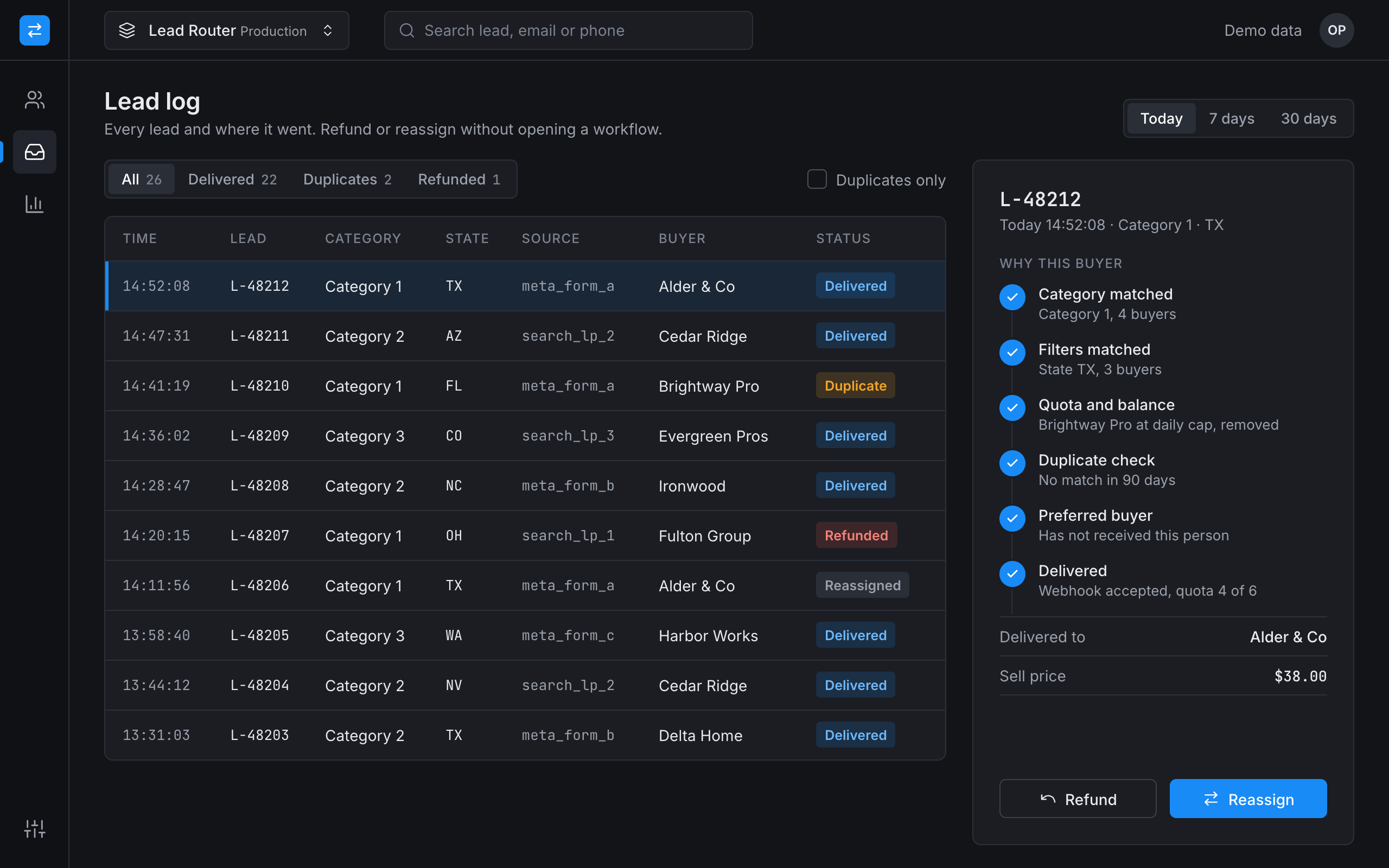
Lead log. The side panel answers why this buyer got the lead. Redrawn with demo data.
A refund takes the lead off the buyer and gives the quota back. A reassignment does that and charges the new buyer in the same step. The log can be filtered to duplicates only, which is where most buyer questions start.
The panel also has a test mode: a lead can be run through the rules without delivery, so a new filter can be checked before a real lead meets it.
The hard parts
Moving the rules without stopping sales
The company sold leads every day, so we could not switch everything off for a rebuild. We moved buyers over in stages and kept the old paths until the new one handled them. The launch had no serious architectural failures. The fixes that followed were about duplicates, quotas and webhook timing.
Who can take a lead right now
A buyer takes a lead only while the cap, the balance and the active switch all allow it. We keep these numbers in PostgreSQL, so the panel and the router read the same figures. When a buyer stops receiving leads, the team sees the reason in the buyer list instead of opening a workflow.
Duplicates, tuned on live traffic
The first rules were too blunt. We refined them in May 2026 on real leads: email compared without case, phone numbers compared in one format, and older matches flagged separately, because a person who comes back months later can be a new request.
Reassigning a lead that is already sold
A reassignment touches two buyers at once, so both changes run in one database transaction. A failure halfway cannot leave a lead counted twice or lost. If delivery to the new buyer fails, the lead gets an error status the team can see and retry.
Result
The core has been in production since January 2026. One system replaced several services and scattered workflows, and the team handles every manual action in one panel.
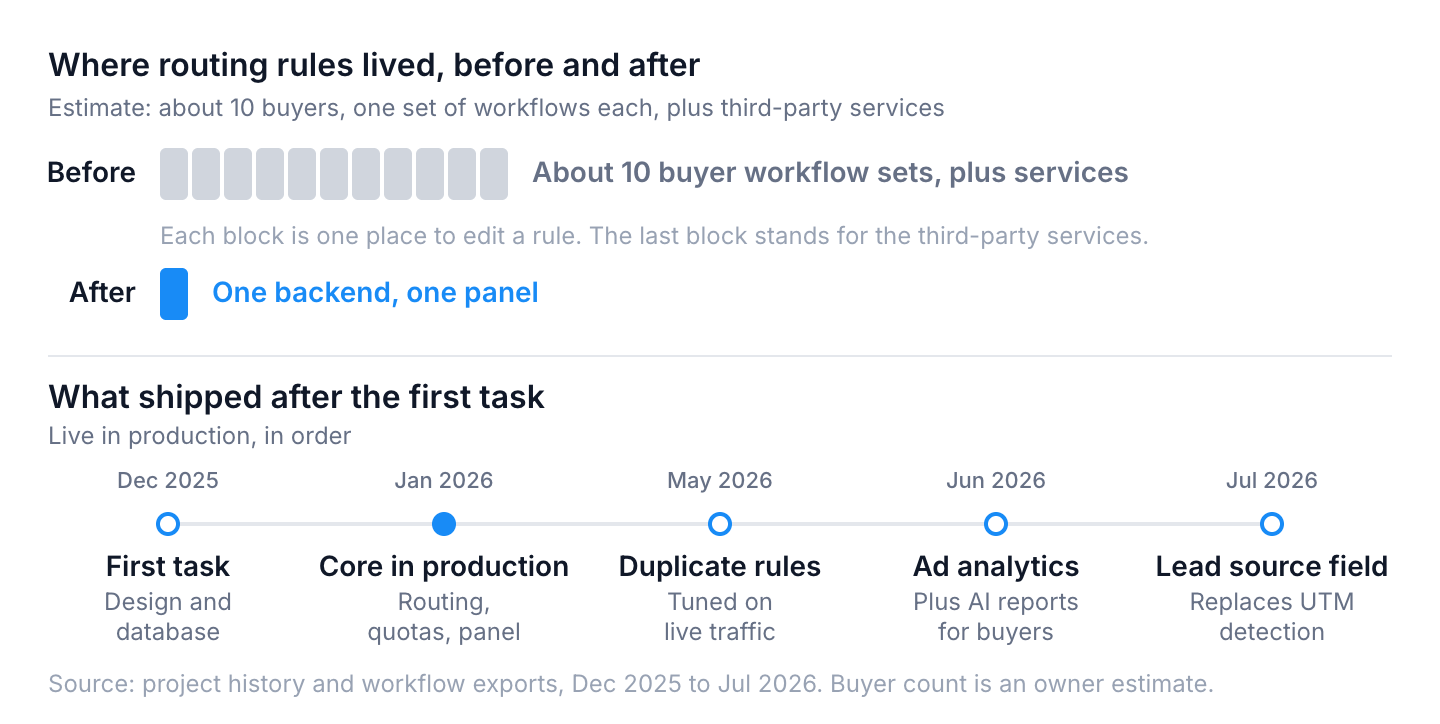
Where the rules lived, and what shipped after the first task. Buyer count is an estimate.
| Before | After | |
|---|---|---|
| Where rules are changed | Third-party services and about 10 workflow sets | One panel |
| Why a buyer got a lead | Reconstructed from several tools | Decision trail in the log |
| Duplicates | Found after the buyer complained | Checked before delivery |
| Refund or reassign | Edits in several tools | One action, one transaction |
| Cost against revenue | Monthly spreadsheet | Ad spend, cost per lead and margin on one screen |
After launch the panel got ad account analytics in June 2026, buyers got automatic AI reports at the end of that month, and in July we moved lead source detection from UTM parameters to a dedicated lead source field. The profitability view now ties ad spend and cost per lead to sale price, revenue and margin. A daily email report covers the ad accounts.
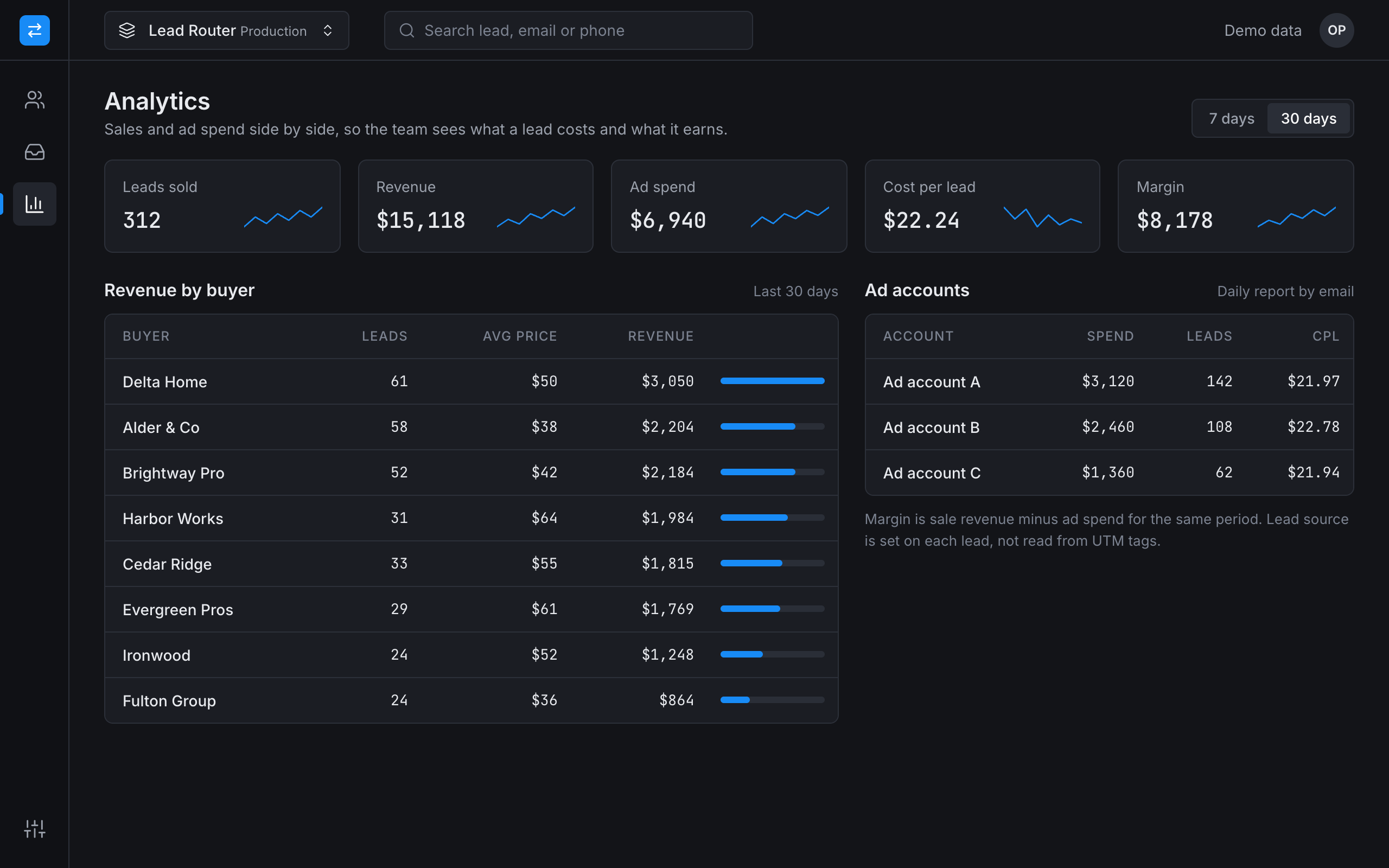
Analytics. Margin is sale revenue minus ad spend for the same period. Redrawn with demo data.
Our part
We designed the architecture and the database, wrote the routing logic and the integrations with GoHighLevel and the buyers' webhooks, and built the operations panel. The analytics, AI reports and profitability view came after launch and are part of the same system. The client's team runs buyers, quotas and refunds in the panel every day.
The same founder also runs a paralegal firm, and we built the legal document automation platform for it. If you are tracing why a lead went to the wrong buyer, start with how to audit lead routing in your CRM and how a webhook queue keeps automation reliable. For a smaller version of the same idea, see our lead routing case for sales teams.
Running a process like this by hand?
Tell us what your team repeats every week. We reply within one business day with a plan and a price.