Project: Test Project 2
Duration: 70 hours
Stack: [object Object], [object Object], [object Object], [object Object], [object Object]
Impact
Turned a manual legal-document workflow into a review-first system for extraction, application preparation, PDF assembly, signatures and refiling.Description
Overview
The legal operations team handles document workflows where the expensive part is not one isolated task. Staff have to move a case through a chain of small, repetitive steps: open incoming documents, read scans, copy values, calculate amounts, prepare applications, add signatures, merge files, correct mistakes and refile documents when something changes.
We built an internal legal operations platform around that entire process. The goal was to reduce the amount of manual preparation without pretending that legal paperwork can safely run without review. Automation does the repetitive work; an operator stays in control of the parts where a wrong field, date or amount can matter.
The challenge
The original process depended heavily on manual document handling. Incoming licenses, tickets and court documents had to be interpreted before their data could be used anywhere else. A single case could contain more than one ticket or application, and the documents were not always clean digital PDFs. Some arrived as scans with inconsistent quality.
That made a simple “OCR the PDF” approach insufficient. Extracted values still had to be associated with the correct document and case, calculations had to be made from those values, and the result had to end up in the right form. Staff also needed the ability to correct information before generation rather than discovering an OCR mistake after a filing package had already been assembled.
Refiled cases added another complication. Previously generated documents could not simply be treated as immutable output. Dates, amounts and other fields might change, and several documents sometimes had to be merged into one application package.
What we built
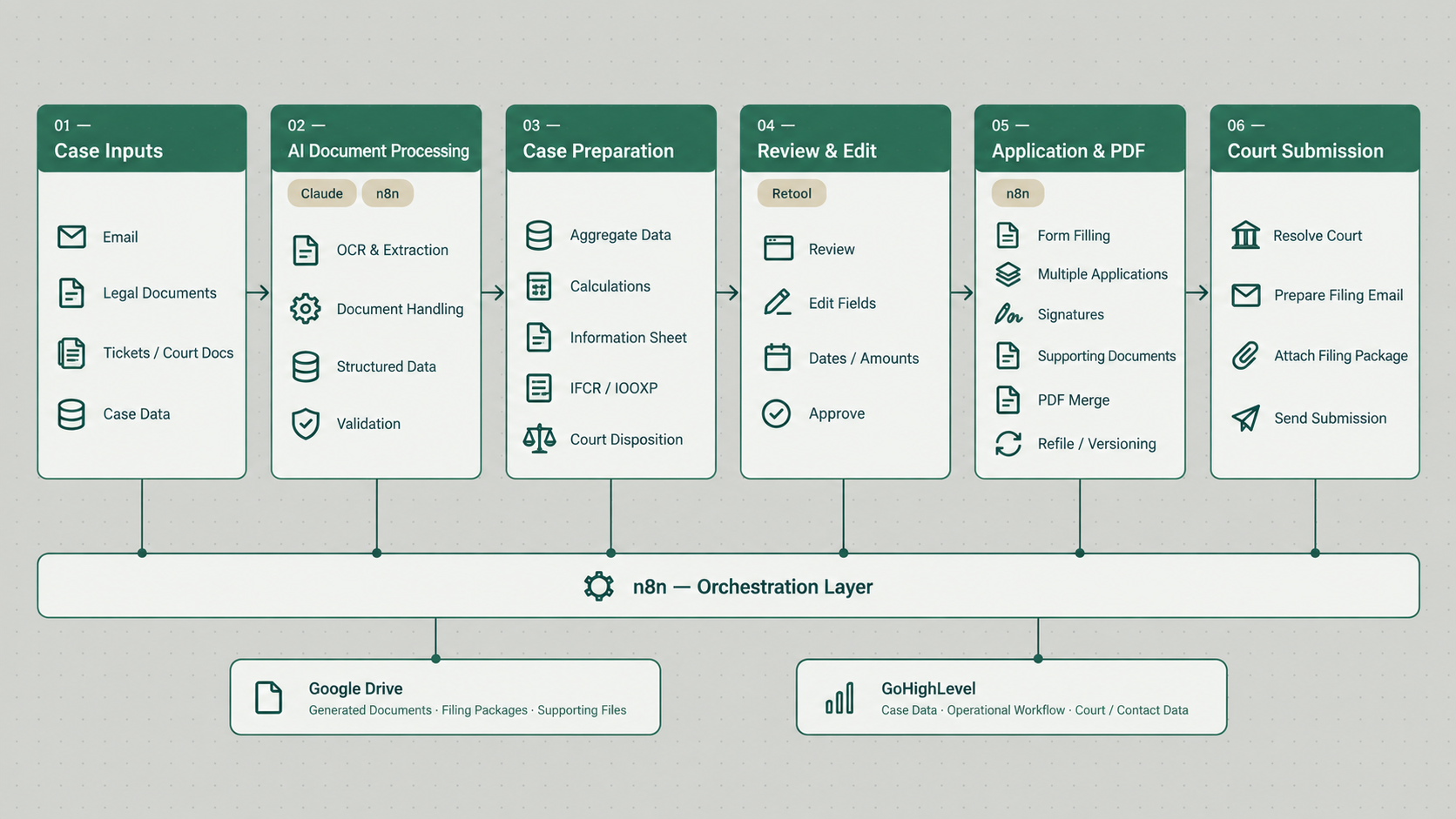
The system combines document ingestion, OCR and AI-assisted extraction, structured case data, human review, application generation and PDF assembly in one workflow.
Incoming legal documents are processed through extraction steps that identify the fields required downstream. The extracted information is converted into structured data instead of being left as free-form OCR text. Additional validation passes are used before the result reaches the operator.
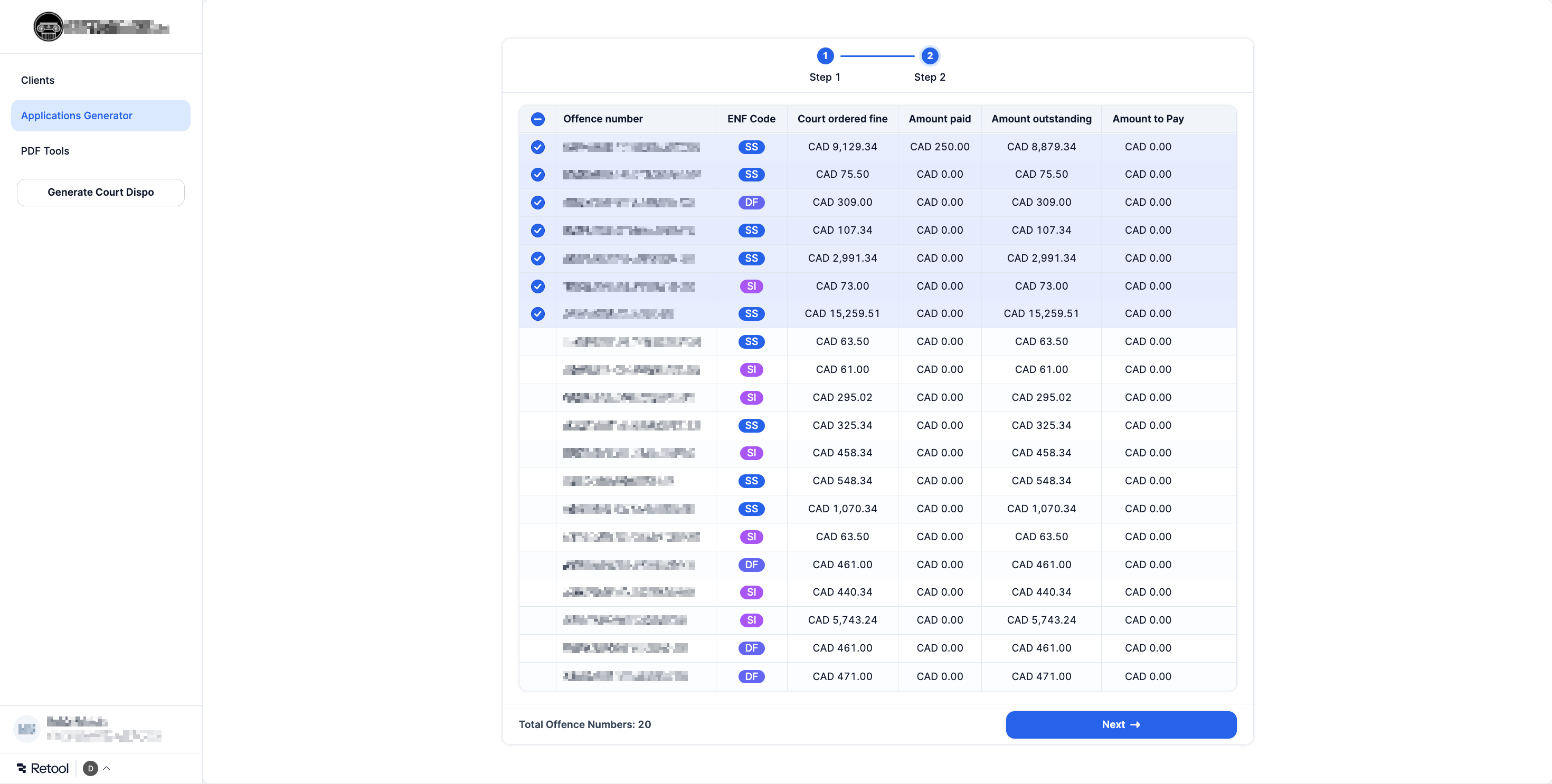
Retool acts as the operational interface. The administrator can inspect a case, correct values and control generation without editing workflow logic or manipulating raw data. Once the case is ready, the backend fills the relevant application, adds the required signature assets and supporting documents, and assembles the final PDF package.
How the case-processing workflow works
Documents enter through the existing email or case workflow.
OCR and AI extraction convert scans and PDFs into structured fields.
Validation steps check the extracted information before it is used downstream.
The case and extracted fields appear in the internal Retool interface.
The operator reviews or edits values that require confirmation.
The system generates the relevant application and fills its fields.
Signature assets and supporting documents are added where required.
Multiple PDFs are merged into the filing package.
If the case needs to be filed again, the workflow can regenerate the documents from the updated state rather than starting from scratch.
The system resolves the correct court, prepares the filing email and sends the completed filing package.
Why the system keeps a human in the loop
Legal document automation is a good example of where “fully autonomous” is not automatically better. Poor scans can produce uncertain characters. Two documents can expose similar fields in different layouts. A value can be syntactically valid while still being wrong for the case.
For that reason, the architecture treats AI extraction as an acceleration layer rather than the final authority. The workflow prepares structured information and reduces repetitive entry, but the operator has a dedicated review point before the documents are generated.
This also makes corrections practical. Instead of asking staff to edit a generated PDF every time something changes, the preferred path is to update the structured case data and regenerate the document from a known state.
Document generation, signatures and refiling
Extraction is only the first half of the workflow. The system also has to convert structured case data back into the exact documents the operation needs.
Application-generation flows populate form fields from the reviewed case state. Signature handling and PDF merging are part of the same pipeline, so the operator does not need to download several files and assemble them manually in a separate PDF tool.
The workflow also supports the reality that a legal case can change after the first generation. Refiling and version updates were designed into the process so an operator can correct amounts, dates or other case-specific values and generate the package again.
Technical architecture
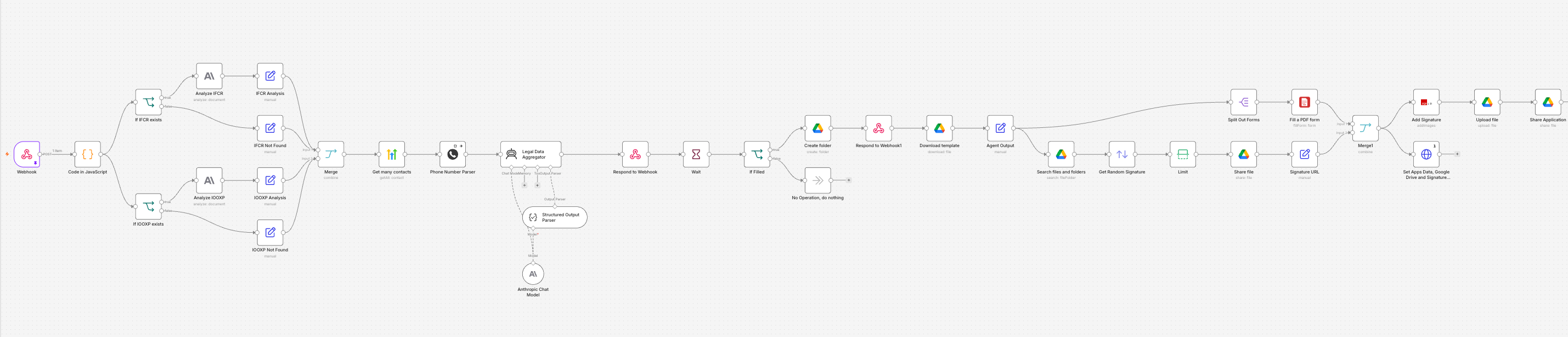
n8n is the orchestration layer connecting document intake, extraction, validation, case state, generation and court submission. Retool provides the internal operations UI. GoHighLevel and Google Drive remain part of the surrounding operational environment, while AI/OCR components convert source documents into structured fields used by the rest of the system.
The architecture deliberately separates extraction from review and generation. That separation makes the workflow easier to debug and reduces the chance that one uncertain OCR result silently propagates all the way into a final court document.
It also gives the business a clear operational state: source document, extracted case data, reviewed data and generated filing are separate artifacts rather than one opaque automation run.
Production constraints and edge cases
The hardest parts of the project have been the unglamorous ones: poor-quality scans, multiple document types, calculations, changing filing state and keeping the operator's review process practical.
One case can contain multiple applications, which means document state cannot be modeled as a single file attached to a lead. Generated PDFs also need to remain editable through the structured workflow when a case is updated.
Those constraints are the reason the project evolved into an operations platform rather than a one-off “extract text from PDFs” automation.
Result
The system is actively used in production and the business already relies on it as part of day-to-day case preparation. The repetitive work of extracting data, preparing forms, handling signatures and assembling PDFs is now concentrated into one guided process with review built in.
Based on working experience with the process, a workflow that could previously consume roughly an hour can in some cases be completed in around ten minutes with review. We treat that as an operational estimate rather than a client-audited performance claim.
The workflow also completes court submission. It resolves the correct court from the case data, prepares the filing email and package, and sends the completed filing package to the court contact stored in the operating environment.